ChooseMyCompany Public Page
Your ChooseMyCompany public page is the dedicated space for your organization on our public website. It highlights your certifications and showcases your best survey results.
Public pages are now automatically published 15 days after obtaining your certification.
Key benefits of this page:
- Employer brand / reputation control: you communicate directly about your strengths and values, highlighting what makes your organization attractive and unique.
- Optimized visibility and SEO: our pages are “AI-readable” and SEO-optimized to appear in online searches and generative AI results.
- Credibility of your results: publishing your results positions you as a responsible, authentic, and consistent organization in its commitments.
- Simplicity and speed: automatic publication after certification, with the ability to manage your content (verbatims, presentation).
How does publication work?
- The page is automatically published 15 days after obtaining your certification.
- During these 15 days (and after), you can add or remove verbatims to be published. You can also choose to publish the page earlier if you wish.
What does the page contain?
1- A “Company Overview” tab
- Your organization’s logo and header image
- Links to your career site and/or corporate website
- List of obtained certifications
- Slogan and short company description
⇒ To manage the information displayed on this page, go to your back office, “Public Page” tab → “Organization Overview”.
2- A “Certified Results” tab
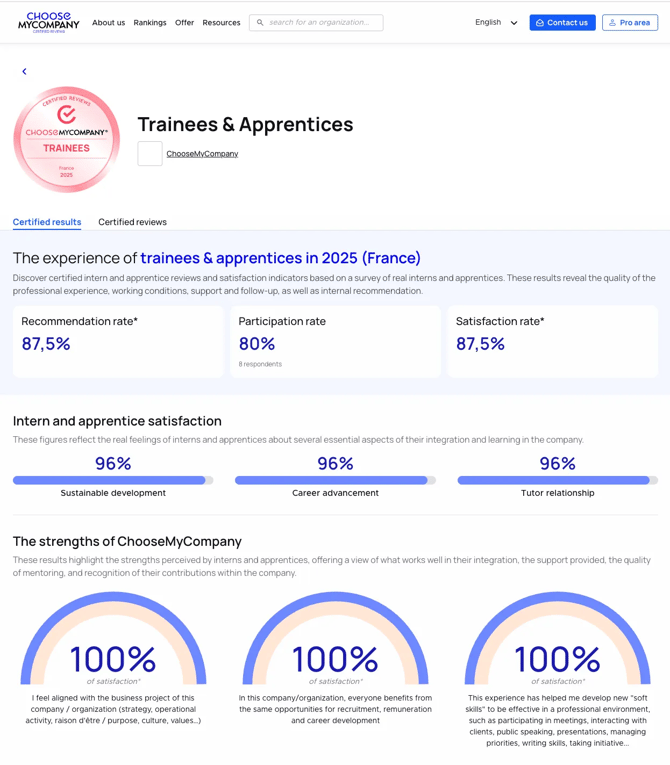
This tab displays your best results by default. These results cannot be modified.
- Your 3 certification criteria (participation rate, recommendation rate, satisfaction rate)
- Satisfaction rates for the 3 best-performing dimensions of your questionnaire
- Satisfaction rates for the 3 best-performing questions of your questionnaire
3- A “Certified Reviews” tab
This tab displays reviews collected from the open-ended questions of your questionnaire.
By default, all positive verbatims from the open question “What do you like MOST?” are published.
⇒ To manage verbatim publication, go to your back office, “Public Page” tab → “Publications”.
Click on “Update” → “Certified Reviews” and select which reviews you want to make public.