What are demographic questions?
Demographic questions are located at the end of your questionnaire and allow you to segment your population.
Demographic questions are used to:
-
Filter a population in order to compare results and refine analysis.
-
More easily track participation rates. For example, it’s possible to monitor the number of respondents from a specific department.
-
Be eligible for certain focus groups.
Here are some example questions:
-
In which country do you work?
-
What is your department / role?
-
My level of professional experience
-
My age
-
My seniority in the company
-
My type of contract
Find the list of demographic questions by model here :
What demographic questions are required to be eligible for our focus groups?
Here is the list of demographic questions required to be eligible for our focus groups.
| HappyIndex® AtWork | HappyIndex® Trainees | HappyIndex® AtSchool | |
| Focus Tech | What is your department/role? | ||
| Focus Women | I identify as | I identify as | I identify as |
| Focus Parent | I am a parent | ||
| Focus Senior | My age | ||
| Focus Diversity & Inclusion | Do you feel you belong to a minority group in this company/organization? | Do you feel you belong to a minority group in this company/organization? | Do you feel you belong to a minority group in this company/organization? |
How to customize them?
Demographic questions can be customized according to your structure. You can:
-
Remove questions that don’t concern you.
-
Modify existing questions (for example, update your own department names).
-
Add questions that you find useful (entity, location, grade, etc.).
To update them, you can send the list of changes to your project manager.
Can demographic questions be optional?
Demographic questions can absolutely be optional.
By default, the questions "I identify as" and "Do you feel you belong to a minority group in this company/organization?" are optional.
You can choose to make other questions optional by discussing it with your project manager.
Prequalified Questions
There are two types of demographic questions:
-
Visible questions in the questionnaire: These are questions that employees must actually see and answer, such as their age, gender, experience, etc.
-
Prequalified questions: These are pieces of information you already have, such as department, entity, or country. These answers are automatically filled in beforehand and will not be shown in the questionnaire, as there is no need to ask employees again.
Prequalified questions allow you to:
-
Ensure the validity of responses: By having some information already (like department or country), it prevents errors since these are pre-filled automatically.
-
Reduce the number of questions in the questionnaire: By avoiding repeating questions you already have answers to, the questionnaire is lighter, making the experience smoother for employees.
For example, the question "Country" is a prequalified question. It will be asked when you add the invitations.
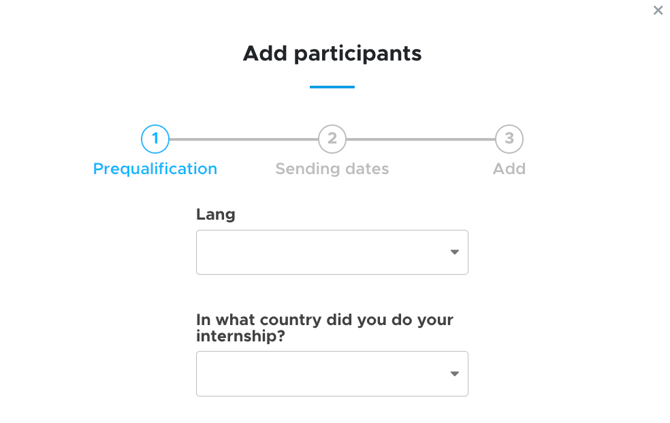
To activate them, simply discuss it with your project manager and send them (via the tab "Security --> Secure Document Transfer") an Excel file containing email addresses/IDs as well as the prequalified questions.
Dependent questions
Dependent questions are questions (demographic or analytical) that only appear based on certain answers or criteria.
For example, in the HappyTrainees® questionnaire, there is a question: "During my assignment, I worked remotely:". If a student answers "yes," a new question "How often?" will appear.
You can also use dependencies between different entities, such as offering specific service choices based on the selected entity.