During the administration of your survey, you may encounter sending errors, for example, if an email address is incorrect or if the invitee has left your organization.
When this happens, the invitation field will be displayed in red (in the "Send" tab).
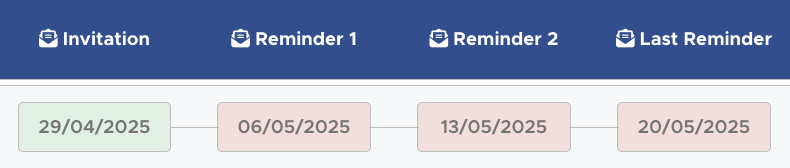
In this case, the email address was deactivated between the first and second invitation.
You can track sending errors :
- Directly on your platform, in the "Send" tab. The number of errors will be clearly indicated there.

In this case, all invitations are in red due to a lack of whitelisting.
- Via the email sent by survey@choosemycompany.com at 4 PM during the first invitation.
What should you do after detecting them?
Once the invitations have been sent, you can no longer modify the invitation list. If you spot a sending error, please send the email addresses to be corrected to your project manager.
They will be able to replace them and send them an invitation right away.